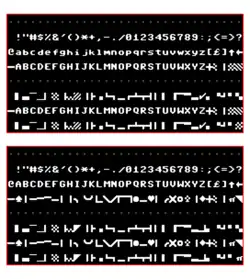
 PETSCII (shifted and unshifted) | |
| Language(s) | English with pseudographics |
|---|---|
| Classification | 8-bit extended early ASCII |
| Based on | US-ASCII (1963 version) |
PETSCII (PET Standard Code of Information Interchange), also known as CBM ASCII, is the character set used in Commodore Business Machines' 8-bit home computers.
This character set was first used by the PET from 1977, and was subsequently used by the CBM-II, VIC-20, Commodore 64, Commodore 16, Commodore 116, Plus/4, and Commodore 128. However, the Amiga personal computer family instead uses standard ISO/IEC 8859-1.
History
The character set was largely designed by Leonard Tramiel (the son of Commodore CEO Jack Tramiel) and PET designer Chuck Peddle.[1][2][3] The graphic characters of PETSCII were one of the extensions Commodore specified for Commodore BASIC when laying out desired changes to Microsoft's existing 6502 BASIC to Microsoft's Ric Weiland in 1977.[4] The VIC-20 used the same pixel-for-pixel font as the PET, although the characters appeared wider due to the VIC's 22-column screen. The Commodore 64, however, used a slightly re-designed, heavy upper-case font, essentially a thicker version of the PET's, in order to avoid color artifacts created by the machine's higher resolution screen. The C64's lowercase characters are identical to the lowercase characters in the Atari 800's system font (released several years earlier).
Peddle claims the inclusion of card suit symbols was spurred by the demand that it should be easy to write card games on the PET (as part of the specification list he received).[2]
Specifications
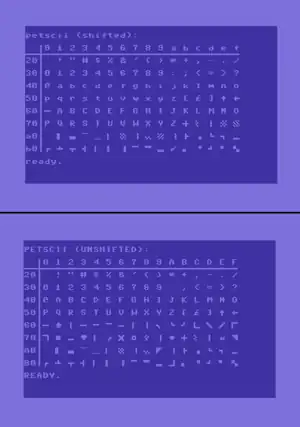
"Unshifted" PETSCII is based on the 1963 version of ASCII (rather than the 1967 version, which most if not all other computer character sets based on ASCII use). It has only uppercase letters, an up-arrow ⟨↑⟩ instead of caret ⟨^⟩ at 0x5E and a left-arrow ⟨←⟩ instead of an underscore ⟨_⟩ at 0x5F. In all versions except the original Commodore PET, it also has a British pound sign ⟨£⟩ instead of the backslash ⟨\⟩ at 0x5C. Other characters added in ASCII-1967 (lowercase letters, the grave accent, curly braces, vertical bar, and tilde) do not exist in PETSCII. Codes 0xA0–0xDF are allotted to CBM-specific block graphics characters—horizontal and vertical lines, hatches, shades, triangles, circles and card suits.
PETSCII also has a "shifted" mode (also called "business mode"), which changes the uppercase letters at 0x41–0x5A to lowercase, and changes the graphics at 0xC1–0xDA to uppercase letters. Upper- and lower-case are swapped from where ASCII has them. The mode is toggled by holding one of the SHIFT keys and then pressing and releasing the Commodore key. The shift can be done by POKEing location 59468 with the value 14 to select the alternative set or 12 to revert to standard. On the Commodore 64, the sets are alternated by flipping bit 2 of the byte 53272. On some models of PET, this can also be achieved via special control code PRINT CHR$(14) which adjust the line spacing as well as changing the character set; the POKE method is still available and does not alter the line spacing.[5]
Included in PETSCII are cursor and screen control codes, such as {HOME}, {CLR}, {RVS ON}, and {RVS OFF} (the latter two activating/deactivating reverse-video character display). The control codes appeared in program listings as reverse-video graphic characters, although some computer magazines, in their efforts to provide more clearly readable listings, pretty-printed the codes using their actual names in curly braces, like the above examples. This is unambiguous as PETSCII has no curly brace characters.
Different mappings are used for storing characters (the "interchange" mapping, as used by CHR$()) and displaying characters (the "video" mapping). For example, to display the characters "@ABC" on screen by directly writing into the screen memory, one would POKE the decimal values 0, 1, 2, and 3 rather than 64, 65, 66, and 67.[6][7]
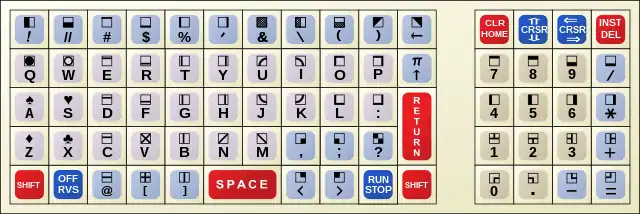
The keyboard by default provides access to the lower half of the code page. Pressing Shift and a key gives the corresponding upper half code point. Some PETSCII code points cannot be printed and are only used for keyboard input (e.g. F1, RUN/STOP).
Character set
The tables below represent the "interchange" PETSCII encoding, as used by CHR$().
Control characters are defined in the ranges 0x00–0x1F and 0x80–0x9F, although which control characters are defined and what they are defined as varies between systems. The tables below exclude control characters—the encoding of control characters in discussed in § Control characters.
The ranges 0x60–0x7F and 0xE0–0xFF are duplicate ranges, although what they duplicate varies between systems. On the Commodore PET, they duplicate 0x20–0x3F and 0xA0–0xBF, respectively; on the Commodore VIC-20, 64, 16, and 128 they duplicate 0xC0–0xDF and 0xA0–0xBF, respectively.[6] While these characters are visually duplicates, they are semantically different; for example, on the Commodore PET, code points 0x2C and 0x6C both produce a comma character, but only 0x2C functions as a delimiter between input fields.[8]
Graphic characters are mostly identical across systems, with the exceptions of 0x5C (which is \ on the Commodore PET, and £ on other systems), 0xD0 (which is U+1FB95 CHECKER BOARD FILL on the Commodore PET and VIC-20, and U+1FB96 INVERSE CHECKER BOARD FILL on other systems), and the range 0x60–0x7F (which duplicates a different range on Commodore PET). Additionally, in Commodore PET 2001's shifted character set, uppercase and lowercase letters are swapped relative to other systems'.
Compatibility symbols for PETSCII characters were added to Unicode 13.0 as part of the Symbols for Legacy Computing block.[9]
Standard
The following tables represent the PETSCII encoding used on the Commodore VIC-20, 64, 16, and 128.
Unshifted
| Unshifted PETSCII[6][10][7][11][12] | ||||||||||||||||
| 0 | 1 | 2 | 3 | 4 | 5 | 6 | 7 | 8 | 9 | A | B | C | D | E | F | |
| 0x | ||||||||||||||||
| 1x | ||||||||||||||||
| 2x | SP | ! | " | # | $ | % | & | ' | ( | ) | * | + | , | - | . | / |
| 3x | 0 | 1 | 2 | 3 | 4 | 5 | 6 | 7 | 8 | 9 | : | ; | < | = | > | ? |
| 4x | @ | A | B | C | D | E | F | G | H | I | J | K | L | M | N | O |
| 5x | P | Q | R | S | T | U | V | W | X | Y | Z | [ | £ | ] | ↑ | ← |
| 6x | ─ | ♠ | 🭲 | 🭸 | 🭷 | 🭶 | 🭺 | 🭱 | 🭴 | ╮ | ╰ | ╯ | 🭼 | ╲ | ╱ | 🭽 |
| 7x | 🭾 | • | 🭻 | ♥ | 🭰 | ╭ | ╳ | ○ | ♣ | 🭵 | ♦ | ┼ | 🮌 | │ | π | ◥ |
| 8x | ||||||||||||||||
| 9x | ||||||||||||||||
| Ax | NBSP | ▌ | ▄ | ▔ | ▁ | ▏ | ▒ | ▕ | 🮏 | ◤ | 🮇 | ├ | ▗ | └ | ┐ | ▂ |
| Bx | ┌ | ┴ | ┬ | ┤ | ▎ | ▍ | 🮈 | 🮂 | 🮃 | ▃ | 🭿 | ▖ | ▝ | ┘ | ▘ | ▚ |
| Cx | ─ | ♠ | 🭲 | 🭸 | 🭷 | 🭶 | 🭺 | 🭱 | 🭴 | ╮ | ╰ | ╯ | 🭼 | ╲ | ╱ | 🭽 |
| Dx | 🭾 | • | 🭻 | ♥ | 🭰 | ╭ | ╳ | ○ | ♣ | 🭵 | ♦ | ┼ | 🮌 | │ | π | ◥ |
| Ex | NBSP | ▌ | ▄ | ▔ | ▁ | ▏ | ▒ | ▕ | 🮏 | ◤ | 🮇 | ├ | ▗ | └ | ┐ | ▂ |
| Fx | ┌ | ┴ | ┬ | ┤ | ▎ | ▍ | 🮈 | 🮂 | 🮃 | ▃ | 🭿 | ▖ | ▝ | ┘ | ▘ | ▚ |
Differs between PETSCII variants.
| ||||||||||||||||
Shifted
| Shifted PETSCII[6][10][7][13][14] | ||||||||||||||||
| 0 | 1 | 2 | 3 | 4 | 5 | 6 | 7 | 8 | 9 | A | B | C | D | E | F | |
| 0x | ||||||||||||||||
| 1x | ||||||||||||||||
| 2x | SP | ! | " | # | $ | % | & | ' | ( | ) | * | + | , | - | . | / |
| 3x | 0 | 1 | 2 | 3 | 4 | 5 | 6 | 7 | 8 | 9 | : | ; | < | = | > | ? |
| 4x | @ | a | b | c | d | e | f | g | h | i | j | k | l | m | n | o |
| 5x | p | q | r | s | t | u | v | w | x | y | z | [ | £ | ] | ↑ | ← |
| 6x | ─ | A | B | C | D | E | F | G | H | I | J | K | L | M | N | O |
| 7x | P | Q | R | S | T | U | V | W | X | Y | Z | ┼ | 🮌 | │ | 🮕/🮖[lower-alpha 1] | 🮘 |
| 8x | ||||||||||||||||
| 9x | ||||||||||||||||
| Ax | NBSP | ▌ | ▄ | ▔ | ▁ | ▏ | ▒ | ▕ | 🮏 | 🮙 | 🮇 | ├ | ▗ | └ | ┐ | ▂ |
| Bx | ┌ | ┴ | ┬ | ┤ | ▎ | ▍ | 🮈 | 🮂 | 🮃 | ▃ | ✓ | ▖ | ▝ | ┘ | ▘ | ▚ |
| Cx | ─ | A | B | C | D | E | F | G | H | I | J | K | L | M | N | O |
| Dx | P | Q | R | S | T | U | V | W | X | Y | Z | ┼ | 🮌 | │ | 🮕/🮖[lower-alpha 1] | 🮘 |
| Ex | NBSP | ▌ | ▄ | ▔ | ▁ | ▏ | ▒ | ▕ | 🮏 | 🮙 | 🮇 | ├ | ▗ | └ | ┐ | ▂ |
| Fx | ┌ | ┴ | ┬ | ┤ | ▎ | ▍ | 🮈 | 🮂 | 🮃 | ▃ | ✓ | ▖ | ▝ | ┘ | ▘ | ▚ |
Differs between PETSCII variants.
| ||||||||||||||||
Commodore PET
Unshifted
| Unshifted PETSCII (PET)[6][15] | ||||||||||||||||
| 0 | 1 | 2 | 3 | 4 | 5 | 6 | 7 | 8 | 9 | A | B | C | D | E | F | |
| 0x | ||||||||||||||||
| 1x | ||||||||||||||||
| 2x | SP | ! | " | # | $ | % | & | ' | ( | ) | * | + | , | - | . | / |
| 3x | 0 | 1 | 2 | 3 | 4 | 5 | 6 | 7 | 8 | 9 | : | ; | < | = | > | ? |
| 4x | @ | A | B | C | D | E | F | G | H | I | J | K | L | M | N | O |
| 5x | P | Q | R | S | T | U | V | W | X | Y | Z | [ | \ | ] | ↑ | ← |
| 6x | SP | ! | " | # | $ | % | & | ' | ( | ) | * | + | , | - | . | / |
| 7x | 0 | 1 | 2 | 3 | 4 | 5 | 6 | 7 | 8 | 9 | : | ; | < | = | > | ? |
| 8x | ||||||||||||||||
| 9x | ||||||||||||||||
| Ax | NBSP | ▌ | ▄ | ▔ | ▁ | ▏ | ▒ | ▕ | 🮏 | ◤ | 🮇 | ├ | ▗ | └ | ┐ | ▂ |
| Bx | ┌ | ┴ | ┬ | ┤ | ▎ | ▍ | 🮈 | 🮂 | 🮃 | ▃ | 🭿 | ▖ | ▝ | ┘ | ▘ | ▚ |
| Cx | ─ | ♠ | 🭲 | 🭸 | 🭷 | 🭶 | 🭺 | 🭱 | 🭴 | ╮ | ╰ | ╯ | 🭼 | ╲ | ╱ | 🭽 |
| Dx | 🭾 | • | 🭻 | ♥ | 🭰 | ╭ | ╳ | ○ | ♣ | 🭵 | ♦ | ┼ | 🮌 | │ | π | ◥ |
| Ex | NBSP | ▌ | ▄ | ▔ | ▁ | ▏ | ▒ | ▕ | 🮏 | ◤ | 🮇 | ├ | ▗ | └ | ┐ | ▂ |
| Fx | ┌ | ┴ | ┬ | ┤ | ▎ | ▍ | 🮈 | 🮂 | 🮃 | ▃ | 🭿 | ▖ | ▝ | ┘ | ▘ | ▚ |
Differs from standard PETSCII.
| ||||||||||||||||
Shifted
| Shifted PETSCII (PET)[6][16] | ||||||||||||||||
| 0 | 1 | 2 | 3 | 4 | 5 | 6 | 7 | 8 | 9 | A | B | C | D | E | F | |
| 0x | ||||||||||||||||
| 1x | ||||||||||||||||
| 2x | SP | ! | " | # | $ | % | & | ' | ( | ) | * | + | , | - | . | / |
| 3x | 0 | 1 | 2 | 3 | 4 | 5 | 6 | 7 | 8 | 9 | : | ; | < | = | > | ? |
| 4x | @ | a | b | c | d | e | f | g | h | i | j | k | l | m | n | o |
| 5x | p | q | r | s | t | u | v | w | x | y | z | [ | \ | ] | ↑ | ← |
| 6x | SP | ! | " | # | $ | % | & | ' | ( | ) | * | + | , | - | . | / |
| 7x | 0 | 1 | 2 | 3 | 4 | 5 | 6 | 7 | 8 | 9 | : | ; | < | = | > | ? |
| 8x | ||||||||||||||||
| 9x | ||||||||||||||||
| Ax | NBSP | ▌ | ▄ | ▔ | ▁ | ▏ | ▒ | ▕ | 🮏 | 🮙 | 🮇 | ├ | ▗ | └ | ┐ | ▂ |
| Bx | ┌ | ┴ | ┬ | ┤ | ▎ | ▍ | 🮈 | 🮂 | 🮃 | ▃ | ✓ | ▖ | ▝ | ┘ | ▘ | ▚ |
| Cx | ─ | A | B | C | D | E | F | G | H | I | J | K | L | M | N | O |
| Dx | P | Q | R | S | T | U | V | W | X | Y | Z | ┼ | 🮌 | │ | 🮕 | 🮘 |
| Ex | NBSP | ▌ | ▄ | ▔ | ▁ | ▏ | ▒ | ▕ | 🮏 | 🮙 | 🮇 | ├ | ▗ | └ | ┐ | ▂ |
| Fx | ┌ | ┴ | ┬ | ┤ | ▎ | ▍ | 🮈 | 🮂 | 🮃 | ▃ | ✓ | ▖ | ▝ | ┘ | ▘ | ▚ |
Displayed case matches the Commodore PET 8032. The opposite case is used on the Commodore PET 2001.
Differs from standard PETSCII.
| ||||||||||||||||
Control characters
While the graphic characters were mostly shared between Commodore systems, the control characters frequently varied. The follow table describes what the control characters represent on the Commodore PET 2001, Commodore PET 8032, VIC-20, Commodore 64, Commodore 16, Commodore 128 (40 and 80 column modes).
| Hex | Decimal | PET 2001 | PET 8032 | VIC-20 | C64 | C16 | C128 (40 col) | C128 (80 col) |
|---|---|---|---|---|---|---|---|---|
| 00 | 0 | — | ||||||
| 01 | 1 | — | ||||||
| 02 | 2 | — | UNDERLINE ON | |||||
| 03 | 3 | STOP | ||||||
| 04 | 4 | — | ||||||
| 05 | 5 | — | WHITE | |||||
| 06 | 6 | — | ||||||
| 07 | 7 | — | BELL | — | BELL | |||
| 08 | 8 | — | LOCK CASE | — | ||||
| 09 | 9 | — | TAB | UNLOCK CASE | TAB | |||
| 0A | 10 | — | LINE FEED | |||||
| 0B | 11 | — | UNLOCK CASE | |||||
| 0C | 12 | — | LOCK CASE | |||||
| 0D | 13 | RETURN | ||||||
| 0E | 14 | — | LOWER CASE | |||||
| 0F | 15 | — | SET WINDOW TOP | — | FLASH ON | |||
| 10 | 16 | — | ||||||
| 11 | 17 | CURSOR DOWN | ||||||
| 12 | 18 | REVERSE ON | ||||||
| 13 | 19 | HOME | ||||||
| 14 | 20 | DEL | ||||||
| 15 | 21 | — | KILL LINE | — | ||||
| 16 | 22 | — | ERASE TO RIGHT | — | ||||
| 17 | 23 | — | ||||||
| 18 | 24 | — | TAB SET/CLEAR | |||||
| 19 | 25 | — | SCROLL UP | — | ||||
| 1A | 26 | — | ||||||
| 1B | 27 | — | ESC | — | ESC | |||
| 1C | 28 | — | RED | |||||
| 1D | 29 | CURSOR RIGHT | ||||||
| 1E | 30 | — | GREEN | |||||
| 1F | 31 | — | BLUE | |||||
| 80 | 128 | — | ||||||
| 81 | 129 | — | ORANGE | DARK PURPLE | ||||
| 82 | 130 | — | FLASH ON | — | UNDERLINE OFF | |||
| 83 | 131 | — | RUN | |||||
| 84 | 132 | — | FLASH OFF | — | ||||
| 85 | 133 | — | F1 | |||||
| 86 | 134 | — | F3 | |||||
| 87 | 135 | — | DOUBLE BELL | F5 | ||||
| 88 | 136 | — | F7 | |||||
| 89 | 137 | — | TAB SET/CLEAR | F2 | ||||
| 8A | 138 | — | F4 | |||||
| 8B | 139 | — | F6 | |||||
| 8C | 140 | — | F8 | HELP | F8 | |||
| 8D | 141 | SHIFT + RETURN | ||||||
| 8E | 142 | — | UPPER CASE | |||||
| 8F | 143 | — | SET WINDOW END | — | FLASH OFF | |||
| 90 | 144 | — | BLACK | |||||
| 91 | 145 | CURSOR UP | ||||||
| 92 | 146 | REVERSE OFF | ||||||
| 93 | 147 | CLEAR | ||||||
| 94 | 148 | INST | ||||||
| 95 | 149 | — | INSERT LINE ABOVE | — | BROWN | DARK YELLOW | ||
| 96 | 150 | — | ERASE TO LEFT | — | PINK | YELLOW-GREEN | PINK | |
| 97 | 151 | — | DARK GRAY | PINK | DARK GRAY | DARK CYAN | ||
| 98 | 152 | — | MEDIUM GRAY | BLUE-GREEN | MEDIUM GRAY | |||
| 99 | 153 | — | SCROLL DOWN | — | LIGHT GREEN | LIGHT BLUE | LIGHT GREEN | |
| 9A | 154 | — | LIGHT BLUE | DARK BLUE | LIGHT BLUE | |||
| 9B | 155 | — | LIGHT GRAY | LIGHT GREEN | LIGHT GRAY | |||
| 9C | 156 | — | PURPLE | |||||
| 9D | 157 | CURSOR LEFT | ||||||
| 9E | 158 | — | YELLOW | |||||
| 9F | 159 | — | CYAN | |||||
The colors of the VIC-20 and C64/128 are listed in the VIC-II article.
Base 128
Out of PETSCII's first 192 codes, there are 128 graphic characters: 32–127 and 160–192. This permits "base128"-style encodings in DATA statements, or perhaps between PETSCII-speaking machines. This can also include control characters, which are visible when quoted, although which control characters are defined varies between systems.
See also
References
- ↑ Reunanen, Markku; Heikkinen, Tero; Carlsson, Anders (22 November 2018). "PETSCII – A Character Set and a Creative Platform" (PDF). Replay. The Polish Journal of Game Studies. 5 (1): 27–47. doi:10.18778/2391-8551.05.02.
- 1 2 Bagnall, Brian (2007). On the Edge: The Spectacular Rise and Fall of Commodore. Winnipeg: Variant Press. pp. 43, 54–55. ISBN 0-9738649-0-7.
- ↑ Tramiel, Leonard (27 December 2021). "Creating PETSCII". Vintage Computer Stories. Blogspot.
- ↑ "A Conversation with Chuck Peddle, Bil Herd, Jeri Ellsworth - part 3 - BIOS - blip.tv". blip.tv. 5 September 2010 [2009]. 6:30. Archived from the original on 9 January 2011. (mirror)
- ↑ Andersson, Larry (25 November 2000). "THE COMMODORE PET COMPUTER FREQUENTLY ASKED QUESTIONS FILE". Zimmers.net. 1.7.
- 1 2 3 4 5 6 7 Oy, Aivosto (2014), "Commodore PETSCII character sets" (PDF), Aivosto
- 1 2 3 Ewell, Doug; Bettencourt, Rebecca; Bánffy, Ricardo; Everson, Michael; Marín Silva, Eduardo; Mårtenson, Elias; Shoulson, Mark; Steele, Shawn; Turner, Rebecca (4 January 2019), "ReadMe.txt", L2/19-025: Proposal to add characters from legacy computers and teletext to the UCS (PDF), The Unicode Consortium
- ↑ Brain, Jim (16 March 1996). "Commodore Trivia Edition #26 Answers for February 1996". Zimmers.net.
Q $195) On CBM machines prior to the VIC-20, what chr$ code outputs the same character as chr$(44), the comma.
A $195) 108.
Q $196) Is the character described in $195 of any use?
A $196) To put commas in strings read via INPUT. Remember, INPUT treats a comma (chr$(44)) as a delimiter between input fields, but chr$(108) does not produce the same effect, so you could replace 44 with 108 in data written to disk, and read it in with INPUT. - ↑ Ewell, Doug; Bettencourt, Rebecca; Bánffy, Ricardo; Everson, Michael; Marín Silva, Eduardo; Mårtenson, Elias; Shoulson, Mark; Steele, Shawn; Turner, Rebecca (4 January 2019), L2/19-025: Proposal to add characters from legacy computers and teletext to the UCS (PDF), The Unicode Consortium
- 1 2 Bettencourt, Rebecca G. "PETSCII to Unicode Mapping". KreativeKorp.
- ↑ Bettencourt, Rebecca (20 April 2018), "CVICIPRI.TXT", L2/19-025: Proposal to add characters from legacy computers and teletext to the UCS (PDF)
- ↑ Bettencourt, Rebecca (20 April 2018), "C64IPRI.TXT", L2/19-025: Proposal to add characters from legacy computers and teletext to the UCS (PDF)
- ↑ Bettencourt, Rebecca (11 October 2018), "CVICIALT.TXT", L2/19-025: Proposal to add characters from legacy computers and teletext to the UCS (PDF)
- ↑ Bettencourt, Rebecca (11 October 2018), "C64IALT.TXT", L2/19-025: Proposal to add characters from legacy computers and teletext to the UCS (PDF)
- ↑ Bettencourt, Rebecca (20 April 2018), "CPETIPRI.TXT", L2/19-025: Proposal to add characters from legacy computers and teletext to the UCS (PDF)
- ↑ Bettencourt, Rebecca (11 October 2018), "CPETIALT.TXT", L2/19-025: Proposal to add characters from legacy computers and teletext to the UCS (PDF)
External links
- PETSCII to Unicode mapping and a TrueType font using that mapping
- Typography in 8 bits: System fonts
- Online PETSCII-art editor
- PETSCII-art
| Early telecommunications | |
|---|---|
| ISO/IEC 8859 |
|
| Bibliographic use | |
| National standards | |
| ISO/IEC 2022 | |
| Mac OS Code pages ("scripts") | |
| DOS code pages | |
| IBM AIX code pages | |
| Windows code pages | |
| EBCDIC code pages | |
| DEC terminals (VTx) | |
| Platform specific |
|
| Unicode / ISO/IEC 10646 | |
| TeX typesetting system | |
| Miscellaneous code pages | |
| Control character | |
| Related topics | |
 Character sets Character sets | |